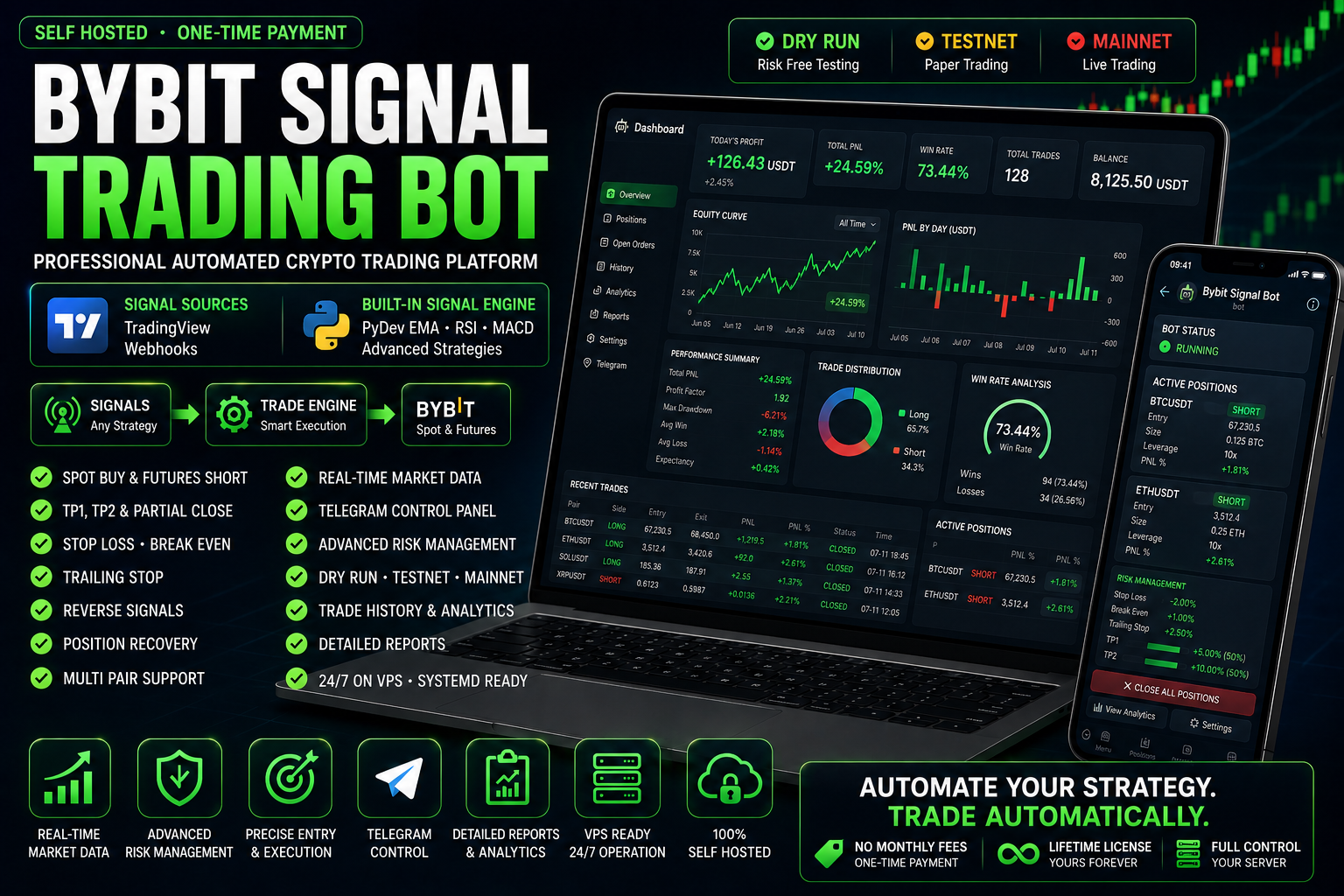
Bybit Signal Trading Bot
Выберите лицензионный план
Выберите пакет, который лучше всего соответствует вашим потребностям в трейдинге и автоматизации.
Lite - Essential trading automation
📦 Включает: ByBitSignalTradingLite.zip (v1.0.0)
- Сигналы через TradingView webhook
- Spot BUY и Futures SHORT операции
- Автоматические Take Profit и Stop Loss
- Функции Break Even и Trailing Stop
- Интерфейс управления через Telegram
- Поддержка нескольких торговых пар
Pro - Advanced trading analytics & automation
📦 Включает: ByBitSignalTradingLite.zip (v1.0.0)
- Все, что включено в тариф Lite
- Продвинутая торговая аналитика
- Фирменный PyDev Signal Engine
- Ежедневные и исторические отчеты
- Анализ профита, ROI и просадки
- Расширенная панель управления в Telegram
Bybit Signal Trading Bot - TradingView to Automated Bybit Trading
Watch the Bybit Signal Trading Bot automate the complete trading workflow from TradingView signals to Telegram, Bybit trade execution, and position management. The platform processes trading signals and automates Bybit Futures trading without manual order entry
Подробности товара & Документация
Automated Spot and Futures trading with TradingView Webhooks and the built-in PyDev Signal Engine
Professional Automated Trading Software for Bybit
The Bybit Signal Trading Bot is a Python-based cryptocurrency trading platform that automatically receives trading signals, opens Spot Buy or Futures Short positions, manages every active trade and controls risk without constant manual monitoring.
The software supports two independent signal sources. You can connect your own TradingView strategy through a webhook or use the integrated PyDev Signal Engine, which analyzes live cryptocurrency market data using EMA, RSI and MACD.
Both signal modes connect to the same trading engine, position manager, risk-management system and Telegram control panel.
Two Signal Sources in One Bybit Trading Bot
Most automated crypto trading bots depend entirely on TradingView alerts. This platform gives you a choice between external TradingView signals and a fully integrated Python strategy engine.
| Feature | TradingView Webhook Mode | PyDev Signal Engine |
|---|---|---|
| Signal source | TradingView alerts | Internal Python strategy |
| TradingView account required | Yes | No |
| Webhook required | Yes | No |
| Custom Pine Script | Supported | Not required |
| Built-in indicators | Defined in TradingView | EMA, RSI and MACD |
| Closed-candle confirmation | Depends on the TradingView strategy | Built in |
| Historical candle loading | Handled by TradingView | Automatic Bybit candle loading |
| Indicator warm-up | Handled by TradingView | Automatic |
| Duplicate signal protection | Depends on the strategy | Built in |
| Spot Buy execution | Supported | Supported |
| Futures Short execution | Supported | Supported |
| Telegram management | Supported | Supported |
| Position recovery after restart | Supported | Supported |
| TP1, TP2, Stop Loss and Trailing Stop | Supported | Supported |
Flexible signal selection: use any TradingView strategy, including SuperTrend or your own Pine Script logic, or enable the autonomous PyDev Signal Engine directly from Telegram.
TradingView Webhook Trading Mode
TradingView mode is designed for traders who already use TradingView indicators, strategies or Pine Script automation.
When a TradingView alert is triggered, it sends a structured webhook request to the bot. The trading engine validates the signal, checks the selected trading pair and automatically performs the configured action on Bybit.
| TradingView Function | How the Bot Uses It |
|---|---|
| BUY_SPOT signal | Opens a Spot Buy position using the configured amount |
| SELL_FUTURES signal | Opens a Futures Short position using the configured quantity and leverage |
| Reverse signal | Closes the current position and attempts to open the opposite position |
| TradingView symbol | Matches the signal with an enabled Bybit trading pair |
| TradingView price | Used as the initial signal and position entry reference |
| Strategy name | Stored with the signal for logging and future analytics |
| Chart interval | Included in every webhook signal |
Compatible with Any TradingView Strategy
The bot is not limited to one indicator. You can connect almost any TradingView strategy capable of producing the required BUY_SPOT and SELL_FUTURES actions.
- SuperTrend strategies
- EMA crossover systems
- RSI strategies
- MACD strategies
- Bollinger Bands strategies
- Custom Pine Script indicators
- Multi-indicator confirmation systems
- Private TradingView strategies
You can disable external TradingView signals and use the built-in Python signal engine as an independent signal source.
Built-in PyDev Signal Engine
The PyDev Signal Engine allows the bot to generate trading signals independently without waiting for an external TradingView webhook.
The engine downloads historical candles from Bybit, warms up all technical indicators and then processes each newly closed candle received through a real-time WebSocket connection.
Signals are generated only after the candle is confirmed as closed. This prevents temporary intra-candle price movements from creating unstable or premature entries.
How the PyDev Signal Engine Works
| Indicator | Purpose | Example Default |
|---|---|---|
| EMA Fast | Detects shorter-term market direction and trend changes | 50 periods |
| EMA Slow | Confirms the broader market trend | 200 periods |
| RSI | Measures market momentum and filters weak entries | 14 periods |
| RSI Buy Level | Defines the minimum bullish momentum required for a Spot Buy signal | 55 |
| RSI Sell Level | Defines the maximum bearish momentum required for a Futures Short signal | 45 |
| MACD Fast | Controls the faster MACD calculation | 12 periods |
| MACD Slow | Controls the slower MACD calculation | 26 periods |
| MACD Signal | Confirms the direction and strength of the MACD movement | 9 periods |
Spot Buy Conditions
A BUY_SPOT signal can be generated when the configured bullish conditions are confirmed:
| Condition | Required State |
|---|---|
| EMA trend | EMA Fast is above EMA Slow |
| Price confirmation | The closing price is above EMA Fast |
| RSI momentum | RSI is equal to or above the configured Buy level |
| MACD direction | MACD is above the MACD Signal line |
| MACD histogram | The MACD histogram is positive |
| Candle state | The candle is fully closed and confirmed |
Futures Short Conditions
A SELL_FUTURES signal can be generated when the configured bearish conditions are confirmed:
| Condition | Required State |
|---|---|
| EMA trend | EMA Fast is below EMA Slow |
| Price confirmation | The closing price is below EMA Fast |
| RSI momentum | RSI is equal to or below the configured Sell level |
| MACD direction | MACD is below the MACD Signal line |
| MACD histogram | The MACD histogram is negative |
| Candle state | The candle is fully closed and confirmed |
Independent Signal Generation
The PyDev Signal Engine works directly with Bybit market data and does not require TradingView, Pine Script or an external alert subscription.
All indicator periods, RSI levels and the candle interval can be configured remotely from the Telegram interface.
Real Market Data with Safe Testnet Execution
The bot separates market analysis from order execution. This makes it possible to calculate signals using live Bybit Mainnet prices while executing test orders safely on Bybit Testnet.
| System Component | Available Mode | Purpose |
|---|---|---|
| Market Data | Mainnet or Testnet | Receives candles and live ticker prices |
| Signal Engine | Mainnet data recommended | Analyzes real cryptocurrency market conditions |
| Order Execution | Dry Run, Testnet or Mainnet | Controls where the bot places orders |
| Position Monitoring | Mainnet or Testnet market feed | Tracks TP, SL, Break Even and Trailing Stop conditions |
Recommended Testing Configuration
| Market Data | 🟢 Mainnet |
| Signal Source | 🧠 PyDev Signal Engine |
| Order Execution | 🟡 Bybit Testnet |
| Risk to Real Funds | None |
This configuration lets you test the complete automated trading workflow with real market conditions without placing orders using real funds.
From Signal to Automatic Position Management
TradingView Webhook or PyDev Signal Engine
↓
BUY_SPOT or SELL_FUTURES Signal
↓
Trade Engine Validation
↓
Automatic Bybit Order Execution
↓
Position Manager
↓
TP1 · TP2 · Stop Loss · Break Even · Trailing Stop
↓
Telegram Notifications and Trade Report
Why This Bot Is Different
| Standard Signal Bot | Bybit Signal Trading Bot |
|---|---|
| Depends only on TradingView | TradingView plus an independent Python Signal Engine |
| Usually supports one signal source | Supports two independent signal sources |
| Often executes orders only | Manages the complete position lifecycle |
| Manual monitoring after entry | Automatic TP1, TP2, Stop Loss, Break Even and Trailing Stop |
| Limited restart recovery | Restores open positions and WebSocket subscriptions after restart |
| Configuration requires file editing | Core settings can be managed through Telegram |
| One environment for data and execution | Separate Mainnet market data and Testnet order execution |
| Fixed strategy | TradingView strategies or configurable EMA, RSI and MACD logic |
| Limited remote management | Full Telegram control panel |
Automate Your Bybit Trading Strategy
Use your existing TradingView alerts or run the built-in PyDev Signal Engine to automatically open, manage and close Bybit Spot and Futures positions.
The bot is delivered as self-hosted Python software and can run continuously on your own Linux VPS.
No monthly software subscription. No mandatory cloud platform. Full control over your trading environment.
Complete Automated Position Management
Opening an order is only the first part of automated cryptocurrency trading. The Bybit Signal Trading Bot continues monitoring every position after entry and manages the complete trading lifecycle according to the individual settings configured for that pair.
Once a Spot Buy or Futures Short position is created, the bot subscribes to a real-time Bybit price stream and continuously evaluates Take Profit, Stop Loss, Break Even and Trailing Stop conditions.
| Position Management Feature | Purpose | Supported Markets |
|---|---|---|
| Take Profit 1 | Closes the configured percentage of the position at the first profit target | Spot and Futures |
| Take Profit 2 | Closes another configured percentage when the second target is reached | Spot and Futures |
| Stop Loss | Closes the remaining position when the maximum configured loss is reached | Spot and Futures |
| Break Even | Protects the remaining position by moving the effective Stop Loss level to the entry price after TP1 | Spot and Futures |
| Trailing Stop | Follows favorable price movement and protects accumulated profit | Spot and Futures |
| Reverse Signal | Closes the existing position and attempts to open a position in the opposite direction | Spot to Futures and Futures to Spot |
| Emergency Close | Immediately closes one selected position | Spot and Futures |
| Emergency Close All | Closes all positions managed by the bot | Spot and Futures |
| Position Recovery | Restores position monitoring after restarting the bot or VPS | Spot and Futures |
Every Position Is Managed Independently
Each enabled Bybit pair has its own order quantity, leverage, profit targets, closing percentages, Stop Loss and Trailing Stop settings.
This means BTCUSDT, ETHUSDT, SOLUSDT and other pairs can use completely different risk-management profiles while running inside the same trading bot.
Take Profit 1 and Partial Position Closing
The first Take Profit level allows the bot to secure part of the position without immediately closing the entire trade.
When the market reaches the configured TP1 percentage, the bot calculates the quantity to close using the Close Percentage on TP1 setting.
| TP1 Setting | Example Value | Result |
|---|---|---|
| Position quantity | 1 ETH | The bot manages a total position of 1 ETH |
| TP1 percentage | 5% | The first target is calculated 5% from the entry price |
| Close percentage on TP1 | 50% | The bot closes 0.5 ETH when TP1 is reached |
| Remaining quantity | 0.5 ETH | The rest of the position remains under automated management |
| Move Stop Loss to Break Even | Enabled | The remaining position receives entry-price protection |
Partial profit taking can reduce exposure while allowing the remaining quantity to continue toward TP2 or a Trailing Stop exit.
Take Profit 2
Take Profit 2 is the second profit target for the position. It can close another configurable percentage of the remaining quantity.
This gives the trader more control than a single fixed Take Profit order and allows profits to be secured gradually as the market moves in the expected direction.
| TP2 Function | Description |
|---|---|
| Independent percentage | TP2 can use a different percentage distance from the entry price |
| Independent closing amount | The percentage closed at TP2 can be configured separately from TP1 |
| Remaining position management | Any remaining quantity can continue under Trailing Stop protection |
| Spot support | The selected amount of the purchased cryptocurrency is sold |
| Futures support | The selected part of the Short position is closed using a reduce-only order |
Flexible exit structure: TP1 and TP2 do not need to close 100% of the position. The remaining quantity can stay active and be managed by Break Even or Trailing Stop logic.
Automatic Stop Loss Protection
The Stop Loss percentage is configured separately for every trading pair. The bot calculates the Stop Loss price automatically when a new position is created.
| Position Type | Stop Loss Logic |
|---|---|
| Spot Buy | The Stop Loss is placed below the entry price |
| Futures Short | The Stop Loss is placed above the entry price |
The bot monitors the current market price through WebSocket updates. When the configured Stop Loss condition is reached, it closes the remaining position and stops monitoring that symbol until a new position is opened.
Why Software-Based Position Monitoring Is Useful
- One risk-management system for both Spot and Futures positions
- Automatic handling of partial position quantities
- Consistent logic for TradingView and PyDev Signal Engine trades
- Telegram notifications for closing events and errors
- Automatic WebSocket unsubscription after a position is fully closed
Important: automated trading cannot eliminate market risk, exchange outages, slippage, liquidity limitations or network delays. Test every configuration on Dry Run or Bybit Testnet before enabling Mainnet execution.
Break Even Protection
The Break Even function helps protect the remaining part of a profitable position after TP1 has been reached.
When Move Stop Loss to Break Even is enabled, the bot uses the original entry price as a protection level for the remaining quantity.
| Stage | Bot Action |
|---|---|
| Position opened | The normal Stop Loss remains active |
| TP1 reached | The configured part of the position is closed |
| Break Even enabled | The entry price becomes the new protection level |
| Market reverses | The bot closes the remaining quantity near the original entry level |
| Market continues favorably | The position can continue toward TP2 or Trailing Stop |
Break Even protection is optional and can be enabled or disabled for each configured order.
Dynamic Trailing Stop
The Trailing Stop is designed to follow favorable market movement while protecting part of the accumulated unrealized profit.
Unlike a fixed Take Profit target, the Trailing Stop can continue moving as long as the market continues in the profitable direction.
Trailing Stop for Spot Buy Positions
| Market Movement | Bot Behaviour |
|---|---|
| Price creates a new high | The bot updates the highest recorded price |
| Trailing Stop is active | A new Trailing Stop price is calculated below the highest price |
| Price continues rising | The protection level follows the market upward |
| Price falls to the Trailing Stop | The bot sells the remaining Spot quantity |
Trailing Stop for Futures Short Positions
| Market Movement | Bot Behaviour |
|---|---|
| Price creates a new low | The bot updates the lowest recorded price |
| Trailing Stop is active | A new Trailing Stop price is calculated above the lowest price |
| Price continues falling | The protection level follows the favorable downward movement |
| Price rises to the Trailing Stop | The bot closes the remaining Futures Short quantity |
The Trailing Stop percentage is configurable independently for each trading pair.
Automatic Reverse Signal Trading
A reverse signal occurs when the bot already manages an open position and receives a valid signal in the opposite direction.
| Current Position | New Signal | Bot Action |
|---|---|---|
| Spot Buy | SELL_FUTURES | Closes the Spot position and attempts to open a Futures Short position |
| Futures Short | BUY_SPOT | Closes the Short position and attempts to open a Spot Buy position |
| Spot Buy | BUY_SPOT | Rejects the duplicate-direction entry because a position already exists |
| Futures Short | SELL_FUTURES | Rejects the duplicate-direction entry because a position already exists |
Safe Reverse Signal Sequence
Opposite signal received
↓
Validate existing position and remaining quantity
↓
Close the current position
↓
Finalize the closed trade and save its result
↓
Remove the previous WebSocket subscription
↓
Attempt to open the new opposite position
↓
Create new position tracking and WebSocket subscription
If the opposite position cannot be opened because of insufficient balance, disabled trading permissions or an exchange error, the previous position remains closed and the bot returns the reason for the failed new entry.
Independent Risk Settings for Every Bybit Pair
Every configured trading pair has its own order and risk-management profile. The settings can be created and edited from the Telegram control panel.
| Pair Setting | Description | Example |
|---|---|---|
| Bybit Pair | The Spot and Futures symbol used for execution | BTCUSDT |
| Enabled | Controls whether the bot accepts signals for the pair | True |
| Spot Amount | Base-coin quantity purchased by a Spot Buy signal | 0.001 BTC |
| Futures Quantity | Contract quantity used for a Futures Short signal | 0.001 BTC |
| Futures Leverage | Configured leverage for the Futures position | 10x |
| TP1 Percentage | Distance from entry to the first Take Profit target | 5% |
| Close Percentage on TP1 | Part of the position closed at TP1 | 50% |
| TP2 Percentage | Distance from entry to the second Take Profit target | 10% |
| Close Percentage on TP2 | Part of the remaining position closed at TP2 | 50% |
| Stop Loss Percentage | Maximum configured adverse price movement | 5% |
| Move SL to Break Even | Activates entry-price protection after TP1 | Enabled |
| Trailing Percentage | Distance used for dynamic Trailing Stop calculation | 3% |
| Allow Spot Buy | Allows BUY_SPOT signals for this pair | Enabled |
| Allow Futures Short | Allows SELL_FUTURES signals for this pair | Enabled |
Multi-Pair Trading
The same bot can monitor multiple configured Bybit pairs. Each active position receives an independent market-data subscription and is managed according to its own entry price, quantity and risk settings.
Telegram Trading Bot Control Panel
The Telegram interface provides remote access to the main trading functions without requiring a desktop environment or direct VPS session.
This is particularly useful when the bot runs continuously on a Linux server and the trader needs to check positions, change parameters or close trades from a phone.
| Telegram Function | Description |
|---|---|
| Orders | Displays all configured Bybit trading pairs |
| Add Order | Creates a new pair configuration through a guided step-by-step process |
| Edit Order | Changes position size, leverage, TP, SL and Trailing Stop settings |
| Enable or Disable Pair | Controls whether the bot can process signals for the selected symbol |
| Delete Order | Removes a selected pair after a confirmation step |
| Open Positions | Shows active positions stored and managed by the bot |
| Emergency Close Position | Closes one selected position immediately |
| Emergency Close All | Attempts to close every position currently managed by the bot |
| PyDev Signal Engine | Opens the built-in indicator configuration menu |
| Runtime Status | Displays the current state of the trading services |
| Engine Status | Shows WebSocket status, loaded candles, last candle and last signal |
PyDev Signal Engine Settings in Telegram
The built-in signal engine can be configured directly from Telegram. There is no need to manually edit the configuration file for standard indicator changes.
| Telegram Setting | Purpose |
|---|---|
| Enable Engine | Activates internal RSI, EMA and MACD signal generation |
| Disable Engine | Stops internal signal generation |
| Change Interval | Selects the candle timeframe used by the strategy |
| Change EMA Fast | Changes the fast Exponential Moving Average period |
| Change EMA Slow | Changes the slow Exponential Moving Average period |
| Change RSI Period | Changes the Relative Strength Index calculation period |
| Change RSI Buy | Changes the bullish RSI threshold |
| Change RSI Sell | Changes the bearish RSI threshold |
| Change MACD Fast | Changes the fast MACD period |
| Change MACD Slow | Changes the slow MACD period |
| Change MACD Signal | Changes the MACD signal-line period |
| Reset Defaults | Restores EMA 50/200, RSI 14 with 55/45 levels and MACD 12/26/9 |
Signal Engine Runtime Information
The Engine Status screen can display operational information for every enabled pair:
- Engine running or stopped
- WebSocket connected or disconnected
- Historical candles loaded
- Current candle interval
- Number of loaded candles
- Last confirmed candle time
- Last closing price
- Last generated BUY_SPOT or SELL_FUTURES signal
- Last WebSocket error
Example Telegram Status
🧠 PyDev Signal Engine
Status: 🟢 Enabled
📡 Market Data
🟢 Mainnet
⚙️ Order Execution
🟡 Testnet
WebSocket: 🟢 Connected
Historical candles: ✅ Loaded
Interval: 15m
Position and Trade Notifications
The bot can send important execution and position-management events directly to Telegram.
| Notification | Information Provided |
|---|---|
| Position Opened | Pair, market, side, entry price and quantity |
| TP1 Reached | Executed quantity and remaining position |
| TP2 Reached | Second partial closing result |
| Break Even Activated | New protection level for the remaining position |
| Trailing Stop Updated | Current dynamic protection level |
| Position Closed | Entry, exit, quantity, PnL, fees, funding, ROI and holding time where available |
| Reverse Signal | Result of closing the previous side and opening the new side |
| Balance Error | Exchange message when the available balance is insufficient |
| Runtime Error | API, WebSocket or order-execution error information |
Trade reports reduce the need to manually compare each Bybit order execution in the exchange history.
Real-Time WebSocket Architecture
The software uses separate asynchronous WebSocket processes for signal generation and position monitoring.
| WebSocket Component | Function |
|---|---|
| Kline WebSocket Manager | Receives closed candlestick data for the built-in PyDev Signal Engine |
| Ticker WebSocket Manager | Receives live prices for active position management |
| Dynamic Subscription | Subscribes to a symbol when the bot creates or restores a position |
| Dynamic Unsubscription | Removes a subscription after the position is fully closed |
| Automatic Reconnection | Attempts to restore the connection after a network or exchange interruption |
| Multi-Symbol Support | One connection can process multiple active cryptocurrency pairs |
| Background Thread | Runs WebSocket processing independently from Telegram and webhook handling |
WebSocket Trading Workflow
Bybit Mainnet Candle Stream
↓
Kline WebSocket Manager
↓
Closed Candle Confirmation
↓
PyDev Signal Engine
↓
Trade Engine
↓
Bybit Testnet or Mainnet Order
↓
Live Ticker WebSocket
↓
Position Manager
Automatic WebSocket Reconnection
Temporary internet interruptions and exchange-side WebSocket disconnections are handled by an automatic reconnection loop.
| Connection Event | Bot Response |
|---|---|
| Initial connection | Connects to the configured Bybit public market-data endpoint |
| Successful connection | Subscribes to all required symbols |
| Connection error | Records the error and waits before reconnecting |
| Reconnection | Creates a new WebSocket connection |
| Subscription recovery | Resubscribes to all active symbols |
| Bot shutdown | Closes the WebSocket connection cleanly |
Automatic Position Recovery After Restart
The bot stores position state locally and checks for open positions during runtime initialization.
This protects the trading workflow when the VPS restarts, the system service is updated or the bot process is stopped temporarily.
| Startup Recovery Step | Action |
|---|---|
| Load position storage | Reads all locally saved positions |
| Filter active positions | Selects positions with open status and positive remaining quantity |
| Restore symbol monitoring | Subscribes the ticker WebSocket to every active symbol |
| Resume price processing | Continues TP, SL, Break Even and Trailing Stop evaluation |
| Preserve position data | Keeps the original entry, targets, remaining quantity and creation time |
Designed for 24/7 VPS Operation
The bot can be installed as a Linux system service so it starts automatically after a server reboot and continues running in the background.
Dry Run, Testnet and Mainnet Execution Modes
| Execution Mode | Order Behaviour | Recommended Use |
|---|---|---|
| Dry Run | Creates simulated orders and local positions without sending an exchange order | Development and initial logic testing |
| Bybit Testnet | Sends real API requests to the Bybit testing environment | Complete workflow testing without real funds |
| Bybit Mainnet | Sends orders to the live Bybit account | Production trading after full testing |
The execution environment is independent from the market-data source. For example, the bot can analyze real Mainnet candles while placing orders only on Bybit Testnet.
Always verify API keys, order quantities, leverage, trading permissions, pair precision and available balance before enabling Mainnet execution.
Built for Stable Automated Trading
| Stability Feature | Benefit |
|---|---|
| Startup diagnostics | Checks Bybit REST API and Telegram connectivity |
| Position persistence | Preserves active position state between restarts |
| Signal validation | Rejects unsupported actions and disabled pairs |
| Duplicate position protection | Prevents opening another position in the same direction |
| Remaining quantity validation | Prevents closing requests with zero or invalid quantity |
| Exchange error handling | Returns Bybit API errors instead of silently losing the event |
| Automatic WebSocket reconnect | Restores real-time data after temporary connection failures |
| System service support | Automatically restarts the bot after a VPS reboot |
Control the Entire Bybit Trading Workflow from Telegram
Configure pairs, manage risk, monitor active positions, adjust the built-in signal engine and close trades remotely from the Telegram control panel.
The bot combines signal generation, automated order execution and real-time position management inside one self-hosted Python application.
Technical Specifications
The Bybit Signal Trading Bot is a self-hosted Python application designed for continuous automated cryptocurrency trading on a Linux VPS.
The software combines TradingView webhook processing, the built-in PyDev Signal Engine, Bybit API integration, real-time WebSocket market data, Telegram control and persistent position management.
| Component | Technology | Purpose |
|---|---|---|
| Programming Language | Python 3 | Main application logic, signal processing and exchange integration |
| Exchange Integration | Bybit Unified Trading API | Spot and Futures order execution |
| Market Data | Bybit Public WebSocket API | Real-time ticker and candlestick updates |
| TradingView Integration | Webhook API | Receives BUY_SPOT and SELL_FUTURES strategy alerts |
| Built-in Strategy | PyDev Signal Engine | Generates signals using EMA, RSI and MACD |
| Remote Control | Telegram Bot API | Order configuration, position monitoring and emergency controls |
| Webhook Server | FastAPI / Uvicorn | Receives and processes TradingView webhook requests |
| Asynchronous Processing | AsyncIO and background threads | Handles WebSocket connections and trading events simultaneously |
| Position Storage | JSON | Stores active positions and restores them after restart |
| Trade History | JSON | Stores completed trades and financial results |
| Configuration Storage | INI configuration files | Stores trading-pair and Signal Engine settings |
| Operating System | Linux recommended | Stable 24/7 operation on a VPS |
| Process Management | systemd | Automatic startup and restart after server reboot |
Supported Trading Functions
| Trading Function | Supported | Description |
|---|---|---|
| Spot Buy | ✅ | Automatically buys the configured base-coin quantity |
| Spot Sell | ✅ | Sells a partial or full Spot position during TP, SL, Trailing Stop or reversal |
| Futures Short | ✅ | Automatically opens a USDT perpetual Short position |
| Futures Position Close | ✅ | Uses reduce-only orders to close Short positions |
| Reverse Signal | ✅ | Closes the current position and attempts to open the opposite side |
| TP1 | ✅ | First partial profit target |
| TP2 | ✅ | Second partial profit target |
| Stop Loss | ✅ | Closes the remaining quantity at the configured loss threshold |
| Break Even | ✅ | Protects the remaining position near the entry price after TP1 |
| Trailing Stop | ✅ | Dynamically follows favorable price movement |
| Emergency Close | ✅ | Closes one selected position manually |
| Emergency Close All | ✅ | Closes all positions managed by the bot |
| Position Recovery | ✅ | Restores active positions after bot or server restart |
| Multi-Pair Trading | ✅ | Supports multiple independently configured trading pairs |
| Dry Run | ✅ | Simulates trading without sending real exchange orders |
| Bybit Testnet | ✅ | Tests the complete workflow using the Bybit testing environment |
| Bybit Mainnet | ✅ | Supports live account execution after configuration and testing |
Signal Sources
| Signal Source | Supported | Description |
|---|---|---|
| TradingView Webhooks | ✅ | Accepts external alerts from Pine Script strategies and indicators |
| PyDev Signal Engine | ✅ | Generates internal signals using EMA, RSI and MACD |
| TradingView SuperTrend | ✅ | Can process BUY_SPOT and SELL_FUTURES alerts from a SuperTrend strategy |
| Custom Pine Script | ✅ | Supports custom webhook-compatible TradingView logic |
| Closed-Candle Signals | ✅ | Built-in engine evaluates indicators only after candle confirmation |
| Duplicate Signal Protection | ✅ | Prevents repeated same-direction signals from opening duplicate positions |
Software Requirements
The application is designed for Linux-based deployment. It can also be developed and tested locally on Windows or Linux, but continuous operation is recommended on a dedicated VPS.
| Requirement | Recommended Version | Notes |
|---|---|---|
| Operating System | Ubuntu Server 22.04 or newer | Other modern Debian-based Linux distributions may also work |
| Python | Python 3.10 or newer | A virtual environment is recommended |
| pip | Latest stable version | Used to install Python dependencies |
| Internet Connection | Stable broadband connection | Required for Bybit API, WebSocket and Telegram |
| Public IP Address | Required for TradingView webhook mode | The webhook endpoint must be accessible from the internet |
| Open Webhook Port | 80, 443 or custom port | Depends on deployment and reverse-proxy configuration |
| Bybit Account | Required | Testnet or Mainnet API keys are required for order execution |
| Telegram Bot | Required for remote control | Created through BotFather |
| TradingView Account | Optional | Required only when TradingView webhook mode is used |
| SSL Certificate | Recommended | Useful when exposing the webhook through HTTPS |
Python Dependencies
The exact dependency list is provided with the software package. The application typically uses libraries for:
- Bybit API integration
- WebSocket connections
- FastAPI webhook processing
- Uvicorn application serving
- Telegram Bot API integration
- Configuration management
- JSON persistence
- Asynchronous and threaded processing
A Python virtual environment is recommended to isolate the bot dependencies from the operating system packages.
VPS Requirements
The bot does not require a graphical desktop environment. A standard Linux server with SSH access is sufficient.
Minimum VPS Configuration
| Resource | Minimum | Recommended |
|---|---|---|
| CPU | 1 vCPU | 2 vCPUs or more |
| RAM | 2 GB | 4 GB or more |
| Storage | 20 GB SSD | 40 GB NVMe SSD or more |
| Network | Stable internet | Low-latency connection to Bybit |
| Operating System | Ubuntu Server | Ubuntu Server 22.04 / 24.04 |
| Access | SSH user with sudo | Root or sudo-enabled administrator account |
| Public IPv4 | Recommended | Required for direct TradingView webhook access |
Recommended Production VPS
| CPU | 2–4 vCPUs |
| RAM | 4–8 GB |
| Storage | 40–80 GB NVMe SSD |
| Operating System | Ubuntu Server LTS |
| Process Manager | systemd |
| Firewall | UFW or provider firewall |
| HTTPS | Nginx and Let's Encrypt recommended |
The recommended server size depends on the number of active trading pairs, additional monitoring services, log retention and future database or analytics modules.
A very small 1 vCPU server may run the basic application, but a 2 vCPU and 4 GB RAM configuration is recommended for stable long-term operation.
VPS Deployment Architecture
TradingView or PyDev Signal Engine
↓
Public Webhook / Bybit Market Data
↓
Linux VPS
↓
FastAPI + Trade Engine + WebSocket Managers
↓
Bybit API
↓
Telegram Notifications and Control
The application can run entirely in the background. A desktop environment, VNC connection or graphical interface is not required.
Installation Process
The standard installation process includes preparing the server, configuring the application and running a complete Testnet verification before Mainnet use.
| Installation Step | Description |
|---|---|
| 1. VPS Preparation | Update Linux packages and install Python, pip, Git and required system tools |
| 2. Project Upload | Copy the bot files to the selected server directory |
| 3. Virtual Environment | Create an isolated Python environment |
| 4. Dependency Installation | Install all packages from the supplied requirements file |
| 5. Telegram Configuration | Add the Telegram bot token and administrator chat ID |
| 6. Bybit API Configuration | Add Testnet or Mainnet API credentials |
| 7. Trading Pair Configuration | Create enabled pairs and configure order quantities and risk settings |
| 8. Webhook Configuration | Expose the FastAPI endpoint for TradingView alerts when required |
| 9. Signal Engine Configuration | Enable or disable the PyDev Signal Engine and select indicator parameters |
| 10. Test Run | Verify Dry Run or Bybit Testnet operation |
| 11. systemd Service | Create an automatic background service |
| 12. Production Verification | Check logs, API connectivity, Telegram and WebSocket status |
Recommended Installation Sequence
Dry Run
↓
Bybit Testnet
↓
Small Test Orders
↓
Verify TP, SL and Reverse Signals
↓
Mainnet Only After Successful Testing
Automatic Startup with systemd
The bot can be installed as a Linux system service. This allows it to start automatically when the VPS boots and restart after a process failure.
| systemd Function | Benefit |
|---|---|
| Start on boot | The bot launches automatically after a VPS restart |
| Automatic restart | The application can restart after an unexpected process failure |
| Background operation | No terminal window or SSH session must remain open |
| Centralized logs | Application logs can be reviewed through journalctl |
| Service status | The administrator can quickly check whether the bot is running |
The bot also restores locally saved open positions and WebSocket subscriptions after startup.
Product Delivery
The product is delivered as self-hosted software for installation on the customer's own computer or Linux VPS.
| Included Item | Delivery |
|---|---|
| Python Source Code | Included according to the purchased package |
| Project Structure | Application modules, configuration files and storage directories |
| Requirements File | Included for dependency installation |
| Configuration Example | Includes example pair and Signal Engine settings |
| Webhook Example | TradingView JSON payload example |
| Pine Script Example | Basic BUY_SPOT and SELL_FUTURES strategy example where included |
| Installation Instructions | Basic deployment instructions are provided |
| Telegram Setup | Instructions for Telegram bot token and administrator chat ID |
| Bybit API Setup | Instructions for Testnet or Mainnet API credentials |
| systemd Example | Service configuration can be supplied for Linux VPS deployment |
Optional Installation Service
Server installation, VPS configuration, firewall setup, webhook deployment, systemd service creation and Testnet verification may be offered as a separate service.
Self-Hosted Software
The bot runs on your own infrastructure. Your exchange API keys and trading configuration remain inside your environment.
Product Package
| Package Component | Included |
|---|---|
| Bybit Spot Trading | ✅ |
| Bybit Futures Short Trading | ✅ |
| TradingView Webhook Integration | ✅ |
| PyDev Signal Engine | ✅ |
| Telegram Control Panel | ✅ |
| Multi-Pair Configuration | ✅ |
| TP1 and TP2 | ✅ |
| Stop Loss | ✅ |
| Break Even | ✅ |
| Trailing Stop | ✅ |
| Reverse Signal | ✅ |
| Emergency Close | ✅ |
| Position Recovery | ✅ |
| Trade History JSON | ✅ |
| Closed Position Reports | ✅ where supported by the configured build |
| Dry Run | ✅ |
| Testnet | ✅ |
| Mainnet | ✅ |
| Database Analytics | Planned |
| Web Dashboard | Planned |
License
The exact license conditions depend on the selected product package and commercial agreement.
| License Term | Description |
|---|---|
| License Type | Self-hosted software license |
| Usage | For the purchaser's own trading infrastructure unless otherwise agreed |
| Installation | May be installed on the customer's own VPS or computer |
| API Keys | Created and controlled by the customer |
| Source Code | Included only when explicitly stated in the selected package |
| Resale | Not permitted unless a separate reseller license is purchased |
| Redistribution | Not permitted without written authorization |
| Modification | Allowed only according to the purchased source-code license |
| Exchange Risk | The customer remains responsible for all trading decisions and account risk |
| Third-Party Services | Bybit, Telegram, TradingView and VPS services are subject to their own terms |
This software does not guarantee profits. Cryptocurrency trading involves financial risk, and all strategies should be tested before live use.
Support and Custom Development
| Service | Availability |
|---|---|
| Basic Installation Guidance | Available according to the purchased package |
| VPS Installation | Available as an optional service |
| Custom TradingView Strategy Integration | Available as custom development |
| New Signal Engine Strategy | Available as custom development |
| Additional Exchange Integration | Available as custom development |
| Database and Analytics | Planned or available as custom development |
| Telegram Interface Changes | Available as custom development |
| Risk-Management Customization | Available as custom development |
Strategy Analytics & Algorithmic Trading Platform
The Bybit Signal Trading Bot has evolved from a simple TradingView webhook executor into a complete self-hosted algorithmic cryptocurrency trading platform. The current system combines TradingView Webhooks, the built-in PyDev Signal Engine, automated Bybit Spot and Futures execution, advanced position management, persistent SQLite trade storage and professional Strategy Analytics available directly from Telegram.
Every completed trade can be stored with detailed financial and strategy metadata, including the trading pair, market type, position direction, entry price, exit price, quantity, leverage, profit or loss, trading fees, funding, ROI, holding time, closing reason, signal source, strategy name, candle interval and execution environment.
This makes it possible to evaluate not only whether the bot generated profit or loss, but also which pairs, strategies, signal sources and timeframes performed best over different reporting periods.
| Platform Module | Status | Description |
|---|---|---|
| TradingView Webhook Integration | ✅ Implemented | Receives custom TradingView strategy alerts and converts them into Spot Buy or Futures Short actions. |
| PyDev Signal Engine | ✅ Implemented | Generates trading signals directly from confirmed Bybit candles using configurable EMA, RSI and MACD conditions. |
| Bybit Spot Trading | ✅ Implemented | Automatically opens Spot Buy positions and manages multi-stage exits. |
| Bybit Futures Short Trading | ✅ Implemented | Automatically opens USDT perpetual Futures Short positions with leverage and reduce-only closing. |
| Reverse Signal Workflow | ✅ Implemented | Closes the current position when an opposite signal is received and then attempts to open a new position in the opposite direction. |
| TP1 and TP2 | ✅ Implemented | Supports two configurable Take Profit levels with partial position closing. |
| Break Even Protection | ✅ Implemented | Can move Stop Loss protection to the original entry price after TP1. |
| Trailing Stop | ✅ Implemented | Tracks new highs for Spot Buy positions and new lows for Futures Short positions. |
| Stop Loss | ✅ Implemented | Automatically closes positions when the configured loss threshold is reached. |
| Dynamic WebSocket Subscriptions | ✅ Implemented | Subscribes only to symbols with active positions and removes subscriptions after positions are closed. |
| Position Recovery | ✅ Implemented | Restores locally stored open positions and required WebSocket subscriptions after application restart. |
| SQLite Trade Database | ✅ Implemented | Stores completed trades in a structured local analytics database. |
| JSON Trade History | ✅ Implemented | Keeps a separate JSON trade-history record for compatibility and backup. |
| Bybit Closed PnL Integration | ✅ Implemented | Retrieves real Futures entry price, exit price, Closed PnL, opening fee, closing fee and leverage from Bybit. |
| Bybit Spot Execution Reports | ✅ Implemented | Builds Spot trading reports from Bybit execution history and actual Spot fees. |
| Funding Analytics | ✅ Implemented | Retrieves and stores Futures funding values where available. |
| Telegram Control Panel | ✅ Implemented | Controls pair settings, Signal Engine configuration, positions, analytics and emergency closing. |
| Dry Run Mode | ✅ Implemented | Simulates order execution without sending real exchange orders. |
| Bybit Testnet | ✅ Implemented | Tests the complete order, position, analytics and Telegram workflow without real funds. |
| Bybit Mainnet | ✅ Implemented | Supports real Spot and Futures execution after configuration and testing. |
| Independent Market Data Environment | ✅ Implemented | Allows market-data WebSockets to use Mainnet or Testnet independently from order execution. |
Strategy Analytics Capabilities
The integrated Strategy Analytics module transforms the bot from a basic execution tool into a system for measuring, comparing and improving trading performance. Completed positions are analyzed through SQLite and displayed through a dedicated Telegram analytics interface.
The analytics system uses Net Profit as the primary performance metric and can separately track Gross Profit, trading fees, funding, ROI, trade duration and closing reason. This allows traders to understand whether a strategy is profitable before and after real exchange costs.
| Analytics Feature | Status | What It Shows |
|---|---|---|
| Daily Trading Report | ✅ Implemented | Total trades, wins, losses, break-even trades, Win Rate, Gross Profit, fees, funding, Net Profit, ROI and holding time for the current day. |
| Weekly Trading Report | ✅ Implemented | Complete weekly trading-performance summary. |
| Monthly Trading Report | ✅ Implemented | Monthly strategy results with profitability and risk statistics. |
| All-Time Trading Report | ✅ Implemented | Lifetime analytics across all completed trades stored in SQLite. |
| Winning Trades | ✅ Implemented | Number of completed positions with positive Net Profit. |
| Losing Trades | ✅ Implemented | Number of completed positions with negative Net Profit. |
| Break-Even Trades | ✅ Implemented | Positions that closed with approximately zero Net Profit. |
| Win Rate | ✅ Implemented | Percentage of profitable completed trades. |
| Loss Rate | ✅ Implemented | Percentage of losing completed trades. |
| Gross Profit | ✅ Implemented | Trading result before exchange fees where the required source data is available. |
| Trading Fees | ✅ Implemented | Total opening fees, closing fees, average fee and maximum fee. |
| Funding | ✅ Implemented | Total received funding, paid funding and average funding value. |
| Net Profit | ✅ Implemented | Final realized result after trading fees and funding. |
| Average Trade | ✅ Implemented | Average Net Profit across all completed positions. |
| Average Win | ✅ Implemented | Average result of profitable trades. |
| Average Loss | ✅ Implemented | Average result of losing trades. |
| Profit Factor | ✅ Implemented | Gross winning profit divided by the absolute value of gross losses. |
| Expectancy | ✅ Implemented | Average expected Net Profit per trade based on Win Rate, Average Win and Average Loss. |
| ROI Analytics | ✅ Implemented | Average ROI, total ROI, best ROI and worst ROI. |
| Average Holding Time | ✅ Implemented | Average duration between position opening and closing. |
| Best Trades | ✅ Implemented | Ranks completed trades from the highest Net Profit. |
| Worst Trades | ✅ Implemented | Ranks completed trades from the largest loss. |
| Profit by Pair | ✅ Implemented | Shows trades, Win Rate, fees, funding and Net Profit for every trading pair. |
| Profit by Month | ✅ Implemented | Groups completed trades by month and compares monthly performance. |
| Trade History | ✅ Implemented | Displays recent completed trades directly from SQLite. |
| Max Drawdown | ✅ Implemented | Calculates the largest decline from a previous cumulative-profit peak. |
| Telegram Strategy Analytics Menu | ✅ Implemented | Provides direct access to Daily, Weekly, Monthly, All-Time and Advanced Analytics reports. |
Advanced Strategy Analysis
The platform is being extended to store additional metadata for every new trade. This includes the strategy name, signal source, engine type and candle interval. These fields make it possible to compare not only trading pairs, but also the logic and market timeframe that generated each position.
| Advanced Analytics Module | Status | Purpose |
|---|---|---|
| Profit by Timeframe | 🚧 In Development | Compares Net Profit, Win Rate, ROI and Profit Factor across 1m, 3m, 5m, 15m, 30m, 1H, 4H and 1D intervals. |
| Best Timeframe | 🚧 In Development | Identifies which candle interval produced the strongest historical result. |
| Worst Timeframe | 🚧 In Development | Identifies intervals that generated excessive losses or poor expectancy. |
| Profit by Strategy | 🚧 In Development | Compares performance between different TradingView and built-in strategies. |
| Profit by Signal Source | 🚧 In Development | Compares TradingView Webhooks, the PyDev Signal Engine and future signal sources. |
| Profit by Engine | 🚧 In Development | Compares external TradingView execution with internally generated PyDev signals. |
| Pair × Timeframe Analytics | 🚧 In Development | Shows which timeframe is most profitable for each individual cryptocurrency pair. |
| ROI by Timeframe | 🚧 In Development | Compares average return on margin across different candle intervals. |
| Win Rate by Timeframe | 🚧 In Development | Shows how signal accuracy changes between short and long intervals. |
| Expectancy by Timeframe | 🚧 In Development | Measures the expected result per trade for every interval. |
| Profit by Trading Hour | 🔜 Planned | Groups trades by UTC trading session to identify strong and weak market hours. |
| Profit by Weekday | 🔜 Planned | Compares performance from Monday through Sunday. |
| Winning Streak | 🔜 Planned | Calculates the longest sequence of profitable trades. |
| Losing Streak | 🔜 Planned | Calculates the longest sequence of losing trades. |
| Strategy Recommendations | 🔜 Planned | Uses collected statistics to highlight weak timeframes, pairs and signal sources. |
Telegram Strategy Analytics
Strategy Analytics is available directly through the Telegram control panel. The user does not need to connect an external database client or open a separate web application to review core trading statistics.
| Telegram Report | Included Information |
|---|---|
| Daily Report | Trades, wins, losses, Win Rate, Gross Profit, fees, funding, Net Profit, Profit Factor, Expectancy, ROI and holding time. |
| Weekly Report | Seven-day strategy-performance summary. |
| Monthly Report | Monthly trading results and long-term performance comparison. |
| All-Time Report | Complete historical statistics stored in the local SQLite database. |
| Best Trades | Most profitable completed positions. |
| Worst Trades | Largest losing completed positions. |
| Profit by Pair | Performance grouped by BTCUSDT, ETHUSDT, SOLUSDT and other configured pairs. |
| Profit by Month | Historical Net Profit grouped by calendar month. |
| Fees | Opening fees, closing fees, total commissions, average fee and highest fee. |
| Funding | Total funding, received funding, paid funding and average funding. |
| ROI | Average ROI, total ROI, best ROI and worst ROI. |
| Win/Loss | Winning trades, losing trades, break-even trades and Win Rate. |
| Drawdown | Final equity, peak equity, maximum drawdown and drawdown period. |
| Trade History | Recent completed trades with pair, market, result and closing time. |
TradingView and PyDev Signal Engine Performance Tracking
The platform supports two independent signal sources. TradingView can send alerts from custom Pine Script strategies, private indicators or supported public strategies. The PyDev Signal Engine generates signals internally from Bybit market data without requiring TradingView.
Each completed trade can be tagged with its signal engine, source, strategy and interval. This makes future reports able to compare TradingView Webhooks with the built-in EMA, RSI and MACD strategy using the same performance metrics.
| Signal Metadata | Example Value | Analytics Purpose |
|---|---|---|
| Engine | tradingview / pydev | Compares external webhook signals with internal Python-generated signals. |
| Signal Source | webhook / ema_rsi_macd | Shows which signal logic generated the position. |
| Strategy | RSI_EMA_MACD / custom TradingView strategy | Measures performance for each individual strategy. |
| Interval | 1 / 5 / 15 / 60 / 240 / D | Enables Profit by Timeframe and Pair × Timeframe analytics. |
| Execution Mode | dry_run / testnet / mainnet | Separates simulated, Testnet and real Mainnet statistics. |
| Financial Source | bybit_closed_pnl / bybit_spot_executions / local fallback | Shows where the final financial numbers were obtained. |
SQLite Trading Analytics Database
Completed trades are stored in a local SQLite database. SQLite provides structured queries, reliable filtering and fast report generation without requiring a separate database server.
The database can store both financial and strategy metadata, making it suitable for historical analysis, Telegram reports and future web-dashboard development.
| Stored Trade Data | Description |
|---|---|
| Trade Identity | Unique trade ID, position ID, opening order ID and closing order IDs. |
| Market Information | Symbol, Spot or Futures market and position direction. |
| Strategy Information | Engine, signal source, strategy name and candle interval. |
| Execution Information | Dry Run, Testnet or Mainnet mode. |
| Price Information | Entry price, exit price, quantity and remaining quantity. |
| Financial Information | Gross Profit, Closed PnL, opening fee, closing fee, funding, Net Profit and ROI. |
| Position Timing | Opening time, closing time and total holding duration. |
| Closing Information | TP1, TP2, Stop Loss, Break Even, Trailing Stop, Reverse Signal or Emergency Close. |
| Raw Trade Data | Original normalized trade record for debugging and future migrations. |
Analytics Reset and Clean Mainnet Start
Development, Dry Run and Testnet trading can create experimental trades that should not be mixed with future Mainnet performance. The platform includes a safe trading-data reset workflow for starting analytics from a clean state.
Before resetting, the system can create a timestamped backup of the SQLite database, JSON trade history and local position storage. The reset process clears historical analytics while preserving the database schema and indexes.
| Reset Protection | Description |
|---|---|
| Confirmation Warning | Telegram displays a clear warning before any trading data is removed. |
| Backup Creation | Creates a timestamped local backup before clearing analytics. |
| Open Position Check | Reset can be blocked while local or Bybit Futures positions remain open. |
| SQLite Reset | Clears completed trades while preserving tables and indexes. |
| JSON Reset | Clears trade-history and local-position JSON files. |
| Clean Mainnet Statistics | Allows the user to begin collecting real production analytics from zero. |
Market Data and Order Execution Environments
Market data and order execution can be configured independently. This makes it possible to test a strategy using real Mainnet candles while placing orders on Bybit Testnet, or to perform a complete Testnet workflow using both Testnet market data and Testnet order execution.
| Environment | Market Data | Order Execution | Recommended Use |
|---|---|---|---|
| Dry Run | Mainnet or Testnet | Local simulation | Initial development and workflow verification. |
| Mixed Test Mode | Mainnet | Testnet | Testing order execution using live market conditions. |
| Full Testnet | Testnet | Testnet | End-to-end testing inside the Bybit Testnet environment. |
| Mainnet | Mainnet | Mainnet | Real trading after all settings and risk parameters have been verified. |
The Telegram interface displays the active market-data environment and order-execution environment separately, reducing the risk of confusing Testnet and Mainnet operation.
Future Strategy Lab and Web Dashboard
The current Telegram analytics system provides the foundation for a future browser-based Strategy Lab. The planned web dashboard can visualize the same SQLite data through interactive charts and filters.
| Future Platform Feature | Status | Purpose |
|---|---|---|
| Web Analytics Dashboard | 🔜 Planned | Browser interface for performance monitoring and report filtering. |
| Equity Curve Chart | 🔜 Planned | Visual cumulative Net Profit over time. |
| Drawdown Chart | 🔜 Planned | Visual risk and equity-decline analysis. |
| Profit by Pair Chart | 🔜 Planned | Compares profitability between cryptocurrency pairs. |
| Profit by Timeframe Chart | 🔜 Planned | Highlights the strongest and weakest candle intervals. |
| Strategy Comparison | 🔜 Planned | Compares TradingView and PyDev strategies using the same metrics. |
| Trading Session Analysis | 🔜 Planned | Identifies profitable and unprofitable UTC trading sessions. |
| Portfolio Risk Management | 🔜 Planned | Limits combined exposure across multiple open positions. |
| Dynamic Position Sizing | 🔜 Planned | Calculates order quantity from balance, Stop Loss distance and risk percentage. |
| Historical Backtesting | 🔜 Planned | Tests built-in strategies against historical Bybit candles. |
| Multi-Timeframe Confirmation | 🔜 Planned | Confirms lower-timeframe signals with higher-timeframe market structure. |
| Additional Signal Engines | 🔜 Planned | SuperTrend, EMA Crossover, Bollinger Bands, ATR and volume-based strategies. |
| Multi-Exchange Architecture | 🔜 Planned | Extends the platform to additional cryptocurrency exchanges. |
| PostgreSQL Support | 🔜 Planned | Scalable database backend for larger and multi-user deployments. |
Frequently Asked Questions
Below are answers to common questions about the Bybit Signal Trading Bot, TradingView webhook automation, the built-in PyDev Signal Engine, Strategy Analytics, Telegram management and automated Spot and Futures trading.
What is the Bybit Signal Trading Bot?
The Bybit Signal Trading Bot is a self-hosted Python algorithmic trading platform that receives or generates cryptocurrency signals, executes Spot Buy and Futures Short orders on Bybit, manages open positions and records completed trades for Strategy Analytics.
Does the bot require TradingView?
No. TradingView is optional. The bot can receive TradingView webhook alerts or use the built-in PyDev Signal Engine to generate signals directly from Bybit candles.
Can I use my own TradingView strategy?
Yes. The webhook endpoint can receive supported JSON alerts from custom Pine Script strategies, private indicators and other TradingView logic.
What is the PyDev Signal Engine?
The PyDev Signal Engine is an integrated Python strategy module that loads historical Bybit candles, warms up technical indicators and evaluates every confirmed closed candle using configurable EMA, RSI and MACD settings.
Which indicator settings can be changed?
The Telegram interface can configure EMA Fast, EMA Slow, RSI Period, RSI Buy level, RSI Sell level, MACD Fast, MACD Slow, MACD Signal and candle interval.
Which candle intervals are supported?
The Signal Engine can use supported Bybit intervals such as 1m, 3m, 5m, 15m, 30m, 1H, 4H and 1D.
Does the Signal Engine use unfinished candles?
No. Trading logic is evaluated only after a candle is confirmed as closed. This prevents signals from being generated from incomplete candle data.
Can the bot use Mainnet data with Testnet orders?
Yes. Market data and order execution are separate settings. The user can combine Mainnet market data with Testnet execution or run a complete Testnet environment.
Can the bot trade Spot and Futures?
Yes. The current workflow supports Bybit Spot Buy positions and USDT perpetual Futures Short positions.
Can each pair use different risk settings?
Yes. Every configured pair can use its own Spot amount, Futures quantity, leverage, TP1, TP2, Stop Loss, Break Even, Trailing Stop and execution permissions.
What happens after an opposite signal?
The bot treats the event as a Reverse Signal. It closes the current position, finalizes the trade report and attempts to open a new position in the opposite supported market direction.
How are completed Futures trades reported?
The platform requests the matching Bybit Closed PnL record using the closing order ID. It can retry while the exchange is still generating the final record and use a local fallback only when required.
How are Spot reports created?
Spot reports use Bybit execution history to calculate filled quantity, average prices and actual Spot trading fees.
What does Financial Source mean?
Financial Source shows whether the report was generated from Bybit Closed PnL, Bybit Spot executions or a local fallback calculation.
Does the bot include Strategy Analytics?
Yes. The Telegram Strategy Analytics menu provides Daily, Weekly, Monthly, All-Time and advanced trading reports.
What statistics are available?
Available statistics include trades, wins, losses, break-even trades, Win Rate, Loss Rate, Gross Profit, fees, funding, Net Profit, Average Trade, Average Win, Average Loss, Profit Factor, Expectancy, ROI, holding time, best trades, worst trades, Profit by Pair, Profit by Month, Drawdown and Trade History.
Can analytics compare different timeframes?
Timeframe metadata is being added to new trades so the platform can compare Net Profit, Win Rate, ROI and Expectancy across different candle intervals.
Can analytics compare TradingView with the PyDev Signal Engine?
Yes. New trades can store engine, signal source and strategy metadata, providing the foundation for TradingView-versus-PyDev performance comparison.
Can test statistics be cleared before Mainnet?
Yes. The trading-data reset workflow can back up and clear the SQLite database, JSON trade history and local position storage before starting clean Mainnet analytics.
Does the bot restore open positions after restart?
Yes. The bot loads locally stored open positions, restores required price subscriptions and resumes TP, Stop Loss, Break Even and Trailing Stop monitoring.
Can the bot run automatically after a VPS reboot?
Yes. It can be installed as a Linux systemd service for automatic startup and process recovery.
Does the bot require a graphical VPS?
No. It can run through SSH and systemd on Ubuntu Server without a graphical desktop.
What VPS configuration is recommended?
A small configuration may run with 1 vCPU and 2 GB RAM, but 2 vCPUs, 4 GB RAM and NVMe storage are recommended for more stable continuous operation.
Is Dry Run supported?
Yes. Dry Run creates local simulated positions without sending real order requests.
Is Bybit Testnet supported?
Yes. Testnet can be used to verify API connectivity, orders, position management, WebSockets, Telegram reports and analytics without using real funds.
Can the bot trade on Mainnet?
Yes. Mainnet execution is supported after API keys, permissions, order quantities, leverage and risk settings have been tested.
Are withdrawal permissions required?
No. API keys should only have the permissions required for Spot and Futures trading. Withdrawal permissions should remain disabled.
Does the bot guarantee profit?
No. The platform automates the configured rules but cannot guarantee profit or remove market, liquidity, slippage, execution, exchange, leverage or network risks.
Can the platform be customized?
Yes. Custom strategies, additional exchanges, Futures Long execution, portfolio limits, dashboards, backtesting and other modules can be developed separately.
Is the software self-hosted?
Yes. The software runs on the customer’s own VPS or computer, and exchange credentials remain inside that environment.
Is there a mandatory monthly fee?
The standard product can be supplied without a mandatory monthly software subscription. VPS, TradingView and third-party service costs are separate.
Who Is This Algorithmic Trading Platform For?
| User Type | How the Platform Can Be Used |
|---|---|
| TradingView Traders | Automate custom Pine Script and indicator alerts through webhooks. |
| Algorithmic Traders | Run a self-hosted Python execution, position-management and analytics platform. |
| Strategy Researchers | Compare profitability, Win Rate, ROI, timeframes, pairs and signal sources. |
| Trend-Following Traders | Use configurable EMA, RSI and MACD confirmation. |
| Spot Traders | Automate Spot Buy entries and multi-stage exits. |
| Futures Traders | Automate Futures Short entries, leverage and reduce-only closing. |
| VPS Users | Run trading automation continuously without keeping a local computer online. |
| Python Developers | Extend the modular architecture with custom signals, analytics and integrations. |
| Crypto Software Businesses | Use the platform as a foundation for customized algorithmic trading products. |
Bybit Signal Trading Bot Use Cases
| Use Case | Workflow |
|---|---|
| TradingView Strategy Automation | TradingView alert → Webhook → Trade Engine → Spot Buy or Futures Short → Position management → Strategy Analytics. |
| Independent Python Trading | Bybit candles → EMA, RSI and MACD → PyDev signal → Automated order execution. |
| Full Testnet Testing | Bybit Testnet candles → PyDev Signal Engine → Testnet orders → Testnet Closed PnL reports. |
| Mainnet Data with Testnet Execution | Live Mainnet candles → Signal Engine → Bybit Testnet orders. |
| Strategy Comparison | Completed trades → SQLite → Profit by Pair, strategy, source and timeframe comparison. |
| Remote Trading Management | Linux VPS → Telegram control panel → Positions, analytics and emergency closing. |
| Multi-Pair Automation | Multiple enabled pairs → Independent signals → Separate position tracking. |
| Restart-Resistant Trading | Saved positions → VPS restart → Automatic subscription and monitoring recovery. |
| Clean Mainnet Launch | Test data backup → Analytics reset → Fresh Mainnet performance tracking. |
Why Choose Self-Hosted Strategy Analytics?
| Cloud Subscription Bot | Self-Hosted Bybit Trading Platform |
|---|---|
| Runs on a third-party service | Runs on your own Linux VPS or computer |
| API keys are stored by the service provider | API keys remain inside your server environment |
| Recurring subscription may be required | No mandatory monthly software subscription |
| Limited customization | Modular Python architecture |
| Fixed analytics provided by the platform | Custom SQLite reports and Strategy Analytics |
| Limited access to raw trade data | Local JSON and SQLite trade history |
| Service can change pricing or features | You retain your installed software package |
| Limited control over updates | You decide when to update or customize the platform |
| External platform dependency | Self-hosted operation with local data control |
Important Trading Risk Notice
The Bybit Signal Trading Bot is a software automation and analytics tool. It is not financial advice, investment advice or a guarantee of profit.
Cryptocurrency Spot and Futures trading can result in partial or complete loss of funds. Futures leverage can significantly increase both profits and losses.
Historical Strategy Analytics, Win Rate, ROI, Profit Factor and previous trading results do not guarantee future performance.
The customer is responsible for selecting the strategy, configuring order quantities, setting leverage, creating API keys, testing the software and deciding whether Mainnet trading is appropriate.
Always begin with Dry Run or Bybit Testnet. Use small quantities during initial Mainnet verification.
Deploy Your Own Bybit Algorithmic Trading and Strategy Analytics Platform
Connect supported TradingView strategies through webhooks or enable the built-in PyDev Signal Engine with configurable EMA, RSI and MACD indicators.
Automatically open Bybit Spot Buy and Futures Short positions, manage TP1, TP2, Stop Loss, Break Even and Trailing Stop, recover active trades after restart and analyze completed positions through SQLite and Telegram Strategy Analytics.
| Signal Sources | TradingView Webhooks + PyDev Signal Engine |
| Markets | Bybit Spot + USDT Perpetual Futures Short |
| Execution Modes | Dry Run + Testnet + Mainnet |
| Market Data Modes | Mainnet + Testnet |
| Position Management | TP1 + TP2 + Stop Loss + Break Even + Trailing Stop |
| Analytics Storage | SQLite + JSON Trade History |
| Strategy Analytics | Daily + Weekly + Monthly + All-Time + Advanced Reports |
| Remote Control | Telegram |
| Deployment | Self-hosted Linux VPS |
| Position Recovery | Supported |
| Monthly Software Subscription | Not required |
Build, test, automate and analyze your trading workflow while keeping control over the server, exchange API keys, strategies and historical trade data.
The software can be installed on a personal computer or a Linux VPS.
For continuous 24/7 automated trading, a Linux VPS is strongly recommended. A VPS provides stable operation, automatic startup after reboot and uninterrupted signal processing without requiring your local computer to remain powered on.
| Deployment | Recommended |
|---|---|
| Windows PC | Suitable for development, testing and occasional trading. |
| Linux VPS | Recommended for reliable 24/7 automated trading. |
System Requirements
Operating System:
Windows 10/11
macOS
Linux (Ubuntu, Debian and other modern distributions)
Python Version:
Python 3.10+
Description:
The software is written entirely in Python and is fully cross-platform. It can be deployed on Windows, Linux or macOS, while a Linux VPS is recommended for continuous 24/7 automated trading.
.batlauncher for Windows.shlauncher for Linux/macOS
READY-TO-USE SOLUTION
Related Projects
Binance P2P Trade Bot – Self-Hosted Automatic Repricing and Competitor Tracking Software →