
Binance P2P Receipt Sending with Python WebSocket
Sending Receipt to Sellers About Fund Transfers in Binance P2P Chat Using WebSocket and Python Automation
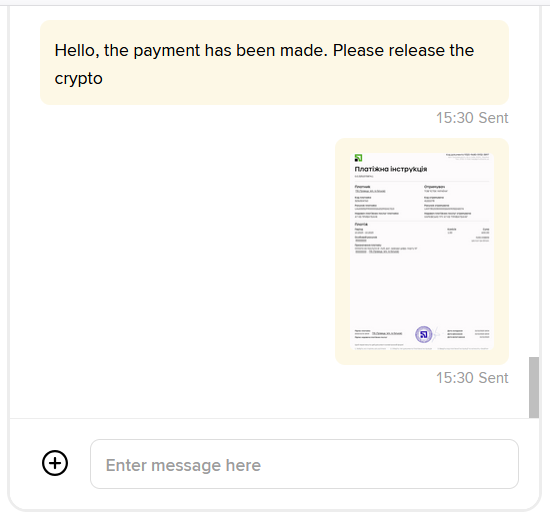
Previously, we covered how to send messages in the Binance P2P chat (Automatic Message Sending to Binance P2P Chat). Now, we will explain how to send a payment receipt to the cryptocurrency seller, specifically a payment confirmation.
In this article, we’ll show how to obtain the necessary chat credentials, connect to Binance’s WebSocket service, and send payment receipts to the seller in the P2P chat. This is especially useful if you’re building a P2P bot or automating cryptocurrency trading tasks.
🔐 Retrieving Chat Credentials for WebSocket
To begin, we need to obtain the chatWssUrl, listenKey, and listenToken to connect to the WebSocket channel.
📦 The retrieveChatCredential Function
def retrieveChatCredential():
    # You Api Key on binance
    api_key = "11111"
    # You Apy Secret on binance
    api_secret = "11111"

    base_url = "https://api.binance.com"

    endpoint = "/sapi/v1/c2c/chat/retrieveChatCredential"
    timestamp = int(time.time() * 1000)
    query_string = f"timestamp={timestamp}"

    signature = hmac.new(
        secret_key.encode('utf-8'),
        query_string.encode('utf-8'),
        hashlib.sha256
    ).hexdigest()

    headers = {
        "clientType": "web",
        "X-MBX-APIKEY": api_key
    }

    url = f"{base_url}{endpoint}?{query_string}&signature={signature}"
    response = requests.get(url, headers=headers)

    if response.status_code == 200:
        return response.json()
    else:
        print("Error:", response.status_code, response.text)
        return None
Once the credentials are retrieved, we construct the connection URL:
We use the websocket-client library to establish a connection and listen for real-time events from the P2P chat.
chatWssUrl = res_detail['data']['chatWssUrl']
listenKey = res_detail['data']['listenKey']
listenToken = res_detail['data']['listenToken']
chat_wss_url = f"{chatWssUrl}/{listenKey}?token={listenToken}&clientType=web"
🔌 Establishing a WebSocket Connection
def connect_to_websocket():
    global reconnect_attempts, ws
    reconnect_attempts = 0
    ws = websocket.WebSocketApp(
        chat_wss_url,
        on_open=on_open,
        on_message=on_message,
        on_error=on_error,
        on_close=on_close
    )
    ws.run_forever()
📡 Event Handlers
- on_open — connection established
- on_message — message received
- on_error — connection error
- on_close — connection closed, auto-reconnect initiated
✉️ Sending a Receipt to the Chat
When the appropriate moment comes (e.g., after transferring funds to the seller), you can call this function:
def send_receipt(order_no: str, file_path: str):
    message_uuid = generate_uuid()
    timestamp = int(time.time() * 1000)
    query_string = f"timestamp={timestamp}"

    signature = hmac.new(
        api_secret.encode('utf-8'),
        query_string.encode('utf-8'),
        hashlib.sha256
    ).hexdigest()

    if not os.path.exists(file_path):
        print(f"File not found: {file_path}")
        return

    # 1️⃣ Get the file name (any name is possible)
    image_name = os.path.basename(file_path)

    headers = {
        "clientType": "web",
        "X-MBX-APIKEY": api_key
    }

    parameters = {
        "timestamp": timestamp,
        "signature": signature
    }

    payload = {...}
Example call:
file_path = r"C:\webSocetBinance\receipt.jpg"
send_receipt("22764965405709934592", file_path)
Full implementation:
import uuid
import websocket
import time
import hmac
import hashlib
import requests
import json
import os

# You Api Key on binance
api_key = "111"

# You Apy Secret on binance
api_secret = "111"


def retrieveChatCredential():
    base_url = "https://api.binance.com"
    endpoint = "/sapi/v1/c2c/chat/retrieveChatCredential"
    timestamp = int(time.time() * 1000)
    query_string = f"timestamp={timestamp}"
    signature = hmac.new(
        api_secret.encode('utf-8'),
        query_string.encode('utf-8'),
        hashlib.sha256
    ).hexdigest()

    headers = {
        "clientType": "web",
        "X-MBX-APIKEY": api_key
    }

    url = f"{base_url}{endpoint}?{query_string}&signature={signature}"
    response = requests.get(url, headers=headers)

    if response.status_code == 200:
        return response.json()
    else:
        print("Error:", response.status_code, response.text)
        return None


res_detail = retrieveChatCredential()

if res_detail:
    chatWssUrl = res_detail['data']['chatWssUrl']
    listenKey = res_detail['data']['listenKey']
    listenToken = res_detail['data']['listenToken']

    chat_wss_url = f"{chatWssUrl}/{listenKey}?token={listenToken}&clientType=web"
    # print("WebSocket URL:", chat_wss_url)
else:
    raise Exception("Failed to obtain credentials for WebSocket.")


def generate_uuid():
    return str(uuid.uuid4())


def send_receipt(order_no: str, file_path: str):
    message_uuid = generate_uuid()
    timestamp = int(time.time() * 1000)
    query_string = f"timestamp={timestamp}"

    signature = hmac.new(
        api_secret.encode('utf-8'),
        query_string.encode('utf-8'),
        hashlib.sha256
    ).hexdigest()

    if not os.path.exists(file_path):
        print(f"File not found: {file_path}")
        return

    # 1️⃣ Get the file name (any name is possible)
    image_name = os.path.basename(file_path)

    headers = {
        "clientType": "web",
        "X-MBX-APIKEY": api_key
    }

    parameters = {
        "timestamp": timestamp,
        "signature": signature
    }

    payload = {...}


def on_open(ws):
    global ws_connection
    ws_connection = ws
    print("WebSocket connection  established for Chat")


def on_message(ws, message):
    try:
        parsed_message = json.loads(message)
        print(f"parsed_message: {parsed_message}")
    except json.JSONDecodeError:
        print("Error JSON:", message)


def on_error(ws, error):
    print("Error WebSocket:", error)


def on_close(ws, close_status_code, close_msg):
    global reconnect_attempts
    print("WebSocket connection closed.", close_msg)

    if reconnect_attempts < 5:
        reconnect_attempts += 1
        print(f"Attempting to reconnect ({reconnect_attempts})...")
        time.sleep(5)
        connect_to_websocket()
    else:
        print("The maximum number of reconnection attempts has been reached.")


reconnect_attempts = 0
ws_connection = None


def connect_to_websocket():
    global reconnect_attempts, ws
    reconnect_attempts = 0
    ws = websocket.WebSocketApp(
        chat_wss_url,
        on_open=on_open,
        on_message=on_message,
        on_error=on_error,
        on_close=on_close
    )
    ws.run_forever()


connect_to_websocket()

file_path = r"C:\webSocetBinance\receipt.jpg"
send_receipt("22764965405709934592", file_path)
Result:
🤖 Benefits of Chat Automation
-
📈 Faster Transactions — sellers receive notifications more quickly.
-
🔒 Improved Security — fewer manual actions mean fewer mistakes.
-
⏱ Time Saving — especially valuable when handling a large volume of trades.
-
🧠 Bot Integration — automation logic can be embedded into your P2P trading bot.
💡 Ready-to-Use Binance P2P Chat Integration
If you need a working implementation instead of building everything from scratch, we provide a ready-to-use Binance P2P Chat WebSocket Python Integration for trading bots and automation tools.
The stack includes a fully working Python implementation that allows you to:
- send messages automatically in Binance P2P chat
- send payment receipt images
- maintain a stable WebSocket connection
- integrate messaging into Binance P2P trading bots
This saves weeks of reverse engineering and lets you integrate chat automation into your trading tools immediately.
Designed for developers building Binance P2P trading bots and automation systems.
⚙️ Full Automation Example
We also offer a complete automation tool — P2Pay Binance Bot, which automatically tracks orders, processes payouts to sellers' bank accounts, and sends notifications and chat messages.
This allows traders to fully automate deal processing and communication with counterparties.
📚 Part of the Spot Arbitrage Guide
This article is part of our complete learning guide covering professional cross-exchange cryptocurrency arbitrage.
📚 Part of the Binance P2P Automation Guide
This article is part of our complete learning guide covering Binance P2P automation, merchant tools and automated trading.




Related Resources
- Binance P2P Trade Bot - Auto Chat, Order Tracking & Instant Crypto Release
- Binance P2P M-PESA Payment Bot for Kenya - Automating Payments with the Safaricom Daraja API
- Crypto Exchange Fees: Complete Guide for Arbitrage Traders
- Spot Arbitrage Guide
- Crypto Arbitrage Risks: Complete Guide to Managing Trading Risks
- Telegram Alerts: Real-Time Notifications for Crypto Traders
Looking for Integration & API Docs?
Explore our official technical reference for Binance SAPI endpoints, including C2C ads management, deposit/withdrawal logs, and REST API examples.
Explore Binance API Documentation →


