
Automatización del Chat P2P de Binance con Python y WebSocket — Envío de comprobantes de pago
📩 Envío Automático de Recibos a los Vendedores en Binance P2P Chat Usando WebSocket y Python
En un artículo anterior explicamos cómo enviar mensajes automáticos en el chat P2P de Binance (Envío automático de mensajes a Binance P2P Chat con WebSocket y Python).
En esta ocasión aprenderás a enviar un comprobante de pago (recibo) directamente al vendedor dentro del chat de Binance P2P, utilizando WebSocket y Python.
Esta función es clave si estás construyendo un bot de arbitraje P2P, un sistema de pagos automatizado o una herramienta de gestión de operaciones cripto.
🔐 Cómo Obtener las Credenciales del Chat para WebSocket
Antes de enviar mensajes o imágenes, debemos recuperar tres valores esenciales:
-
chatWssUrl -
listenKey -
listenToken
Estos datos permiten establecer la conexión WebSocket con el servidor de Binance.
📦 Función retrieveChatCredential()
def retrieveChatCredential():
    # You Api Key on binance
    api_key = "11111"
    # You Apy Secret on binance
    api_secret = "11111"

    base_url = "https://api.binance.com"

    endpoint = "/sapi/v1/c2c/chat/retrieveChatCredential"
    timestamp = int(time.time() * 1000)
    query_string = f"timestamp={timestamp}"

    signature = hmac.new(
        secret_key.encode('utf-8'),
        query_string.encode('utf-8'),
        hashlib.sha256
    ).hexdigest()

    headers = {
        "clientType": "web",
        "X-MBX-APIKEY": api_key
    }

    url = f"{base_url}{endpoint}?{query_string}&signature={signature}"
    response = requests.get(url, headers=headers)

    if response.status_code == 200:
        return response.json()
    else:
        print("Error:", response.status_code, response.text)
        return None
Once the credentials are retrieved, we construct the connection URL:
We use the websocket-client library to establish a connection and listen for real-time events from the P2P chat
chatWssUrl = res_detail['data']['chatWssUrl']
listenKey = res_detail['data']['listenKey']
listenToken = res_detail['data']['listenToken']
chat_wss_url = f"{chatWssUrl}/{listenKey}?token={listenToken}&clientType=web"
🔌 Conexión al WebSocket
def connect_to_websocket():
    global reconnect_attempts, ws
    reconnect_attempts = 0
    ws = websocket.WebSocketApp(
        chat_wss_url,
        on_open=on_open,
        on_message=on_message,
        on_error=on_error,
        on_close=on_close
    )
    ws.run_forever()
📡 Los controladores (on_open, on_message, on_error, on_close) manejan los eventos de la conexión y reconectan automáticamente en caso de error.
✉️ Envío del Recibo de Pago
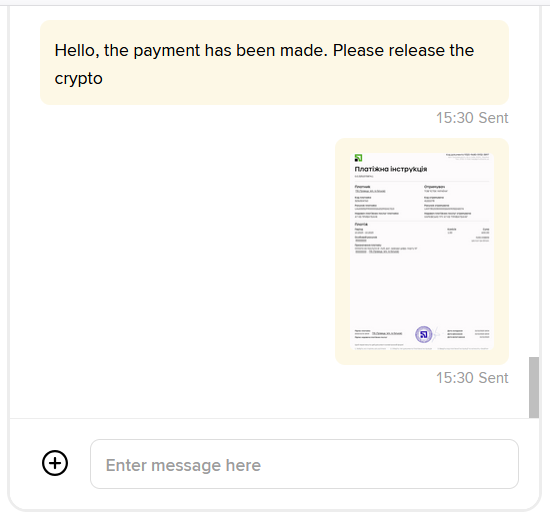
Cuando el comprador realiza la transferencia al vendedor, el bot puede enviar automáticamente el comprobante de pago (imagen) al chat.
def send_receipt(order_no: str, file_path: str):
    message_uuid = generate_uuid()
    timestamp = int(time.time() * 1000)
    query_string = f"timestamp={timestamp}"

    signature = hmac.new(
        api_secret.encode('utf-8'),
        query_string.encode('utf-8'),
        hashlib.sha256
    ).hexdigest()

    if not os.path.exists(file_path):
        print(f"File not found: {file_path}")
        return

    # 1️⃣ Get the file name (any name is possible)
    image_name = os.path.basename(file_path)

    headers = {
        "clientType": "web",
        "X-MBX-APIKEY": api_key
    }

    parameters = {
        "timestamp": timestamp,
        "signature": signature
    }

    payload = {...}
📁 Ejemplo de uso:
file_path = r"C:\webSocetBinance\receipt.jpg"
send_receipt("22764965405709934592", file_path)
Full implementation:
import uuid
import websocket
import time
import hmac
import hashlib
import requests
import json
import os

# You Api Key on binance
api_key = "111"

# You Apy Secret on binance
api_secret = "111"


def retrieveChatCredential():
    base_url = "https://api.binance.com"
    endpoint = "/sapi/v1/c2c/chat/retrieveChatCredential"
    timestamp = int(time.time() * 1000)
    query_string = f"timestamp={timestamp}"
    signature = hmac.new(
        api_secret.encode('utf-8'),
        query_string.encode('utf-8'),
        hashlib.sha256
    ).hexdigest()

    headers = {
        "clientType": "web",
        "X-MBX-APIKEY": api_key
    }

    url = f"{base_url}{endpoint}?{query_string}&signature={signature}"
    response = requests.get(url, headers=headers)

    if response.status_code == 200:
        return response.json()
    else:
        print("Error:", response.status_code, response.text)
        return None


res_detail = retrieveChatCredential()

if res_detail:
    chatWssUrl = res_detail['data']['chatWssUrl']
    listenKey = res_detail['data']['listenKey']
    listenToken = res_detail['data']['listenToken']

    chat_wss_url = f"{chatWssUrl}/{listenKey}?token={listenToken}&clientType=web"
    # print("WebSocket URL:", chat_wss_url)
else:
    raise Exception("Failed to obtain credentials for WebSocket.")


def generate_uuid():
    return str(uuid.uuid4())


def send_receipt(order_no: str, file_path: str):
    message_uuid = generate_uuid()
    timestamp = int(time.time() * 1000)
    query_string = f"timestamp={timestamp}"

    signature = hmac.new(
        api_secret.encode('utf-8'),
        query_string.encode('utf-8'),
        hashlib.sha256
    ).hexdigest()

    if not os.path.exists(file_path):
        print(f"File not found: {file_path}")
        return

    # 1️⃣ Get the file name (any name is possible)
    image_name = os.path.basename(file_path)

    headers = {
        "clientType": "web",
        "X-MBX-APIKEY": api_key
    }

    parameters = {
        "timestamp": timestamp,
        "signature": signature
    }

    payload = {...}


def on_open(ws):
    global ws_connection
    ws_connection = ws
    print("WebSocket connection  established for Chat")


def on_message(ws, message):
    try:
        parsed_message = json.loads(message)
        print(f"parsed_message: {parsed_message}")
    except json.JSONDecodeError:
        print("Error JSON:", message)


def on_error(ws, error):
    print("Error WebSocket:", error)


def on_close(ws, close_status_code, close_msg):
    global reconnect_attempts
    print("WebSocket connection closed.", close_msg)

    if reconnect_attempts < 5:
        reconnect_attempts += 1
        print(f"Attempting to reconnect ({reconnect_attempts})...")
        time.sleep(5)
        connect_to_websocket()
    else:
        print("The maximum number of reconnection attempts has been reached.")


reconnect_attempts = 0
ws_connection = None


def connect_to_websocket():
    global reconnect_attempts, ws
    reconnect_attempts = 0
    ws = websocket.WebSocketApp(
        chat_wss_url,
        on_open=on_open,
        on_message=on_message,
        on_error=on_error,
        on_close=on_close
    )
    ws.run_forever()


connect_to_websocket()

file_path = r"C:\webSocetBinance\receipt.jpg"
send_receipt("22764965405709934592", file_path)
Result:
📈 Beneficios de la Automatización del Chat P2P
-
⚡ Transacciones más rápidas: el vendedor recibe la confirmación inmediatamente.
-
🔒 Más seguridad: se eliminan errores humanos.
-
🧠 Integración con bots: el envío de recibos puede ser parte de tu lógica automatizada.
-
💼 Escalabilidad: ideal para traders que manejan múltiples operaciones diarias.
💡 Integración Lista para Usar – Binance P2P Chat
Si necesitas una implementación funcional sin tener que desarrollar todo desde cero, ofrecemos una Binance P2P Chat WebSocket Python Integration lista para usar, diseñada para bots de trading y herramientas de automatización.
El stack incluye una implementación completa en Python que permite:
- enviar mensajes automáticamente en el chat de Binance P2P
- enviar imágenes de comprobantes de pago
- mantener una conexión WebSocket estable
- integrar mensajería en bots de trading de Binance P2P
Esto te ahorra semanas de ingeniería inversa y te permite integrar automatización del chat en tus herramientas de trading de inmediato.
Diseñado para desarrolladores que crean bots de trading y sistemas de automatización para Binance P2P.
⚙️ Ejemplo de Automatización Completa
También ofrecemos una herramienta completa de automatización — P2Pay Binance Bot, que permite gestionar operaciones P2P automáticamente.
Este bot puede monitorear órdenes, procesar pagos a las cuentas bancarias de los vendedores y enviar notificaciones y mensajes automáticamente en el chat de Binance.
Como resultado, los traders pueden automatizar completamente el procesamiento de operaciones y la comunicación con sus contrapartes.
🔎 Búsquedas Relacionadas
- bot Binance P2P Python
- automatización Binance P2P
- API chat Binance P2P
- WebSocket Binance P2P Python
- herramientas de automatización Binance P2P
Continúa Aprendiendo sobre Binance P2P
Este artículo forma parte de nuestra guía completa de automatización para merchants de Binance P2P.
👉 Explorar la Guía Completa de Automatización para Binance P2P




Recursos y Herramientas Relacionadas
- Binance P2P Trade Bot - Auto Chat, Order Tracking & Instant Crypto Release
- Binance vs OKX vs Bybit para Trading P2P: ¿Cuál es el Mejor Exchange?
- Guía Completa de Automatización para Binance P2P
- Cómo Exportar el Historial de Binance P2P con Nombres Completos a Excel
- Cómo Gestionar Múltiples Anuncios en Binance P2P
- Cómo Operar Binance P2P 24/7 – Guía para Merchants
¿Buscas Documentación Técnica y API?
Consulta nuestra referencia oficial sobre los endpoints de Binance SAPI: gestión de anuncios P2P, historial de depósitos/retiros y ejemplos cURL.
Explorar la Documentación de Binance API →


